
Built-in commands
KickBot adds six built-in commands to every channel when you connect your Kick channel: !commands, !followage, !lurk, !me, !so and !welcome. They are on from the start. You find them in the Built-in commands list on the Custom commands page, where you can turn each one off, change its reply, pick who can use it and add cooldowns.
Built-in commands do not count toward the Free limit of 5 commands that are on. You cannot rename or delete them.
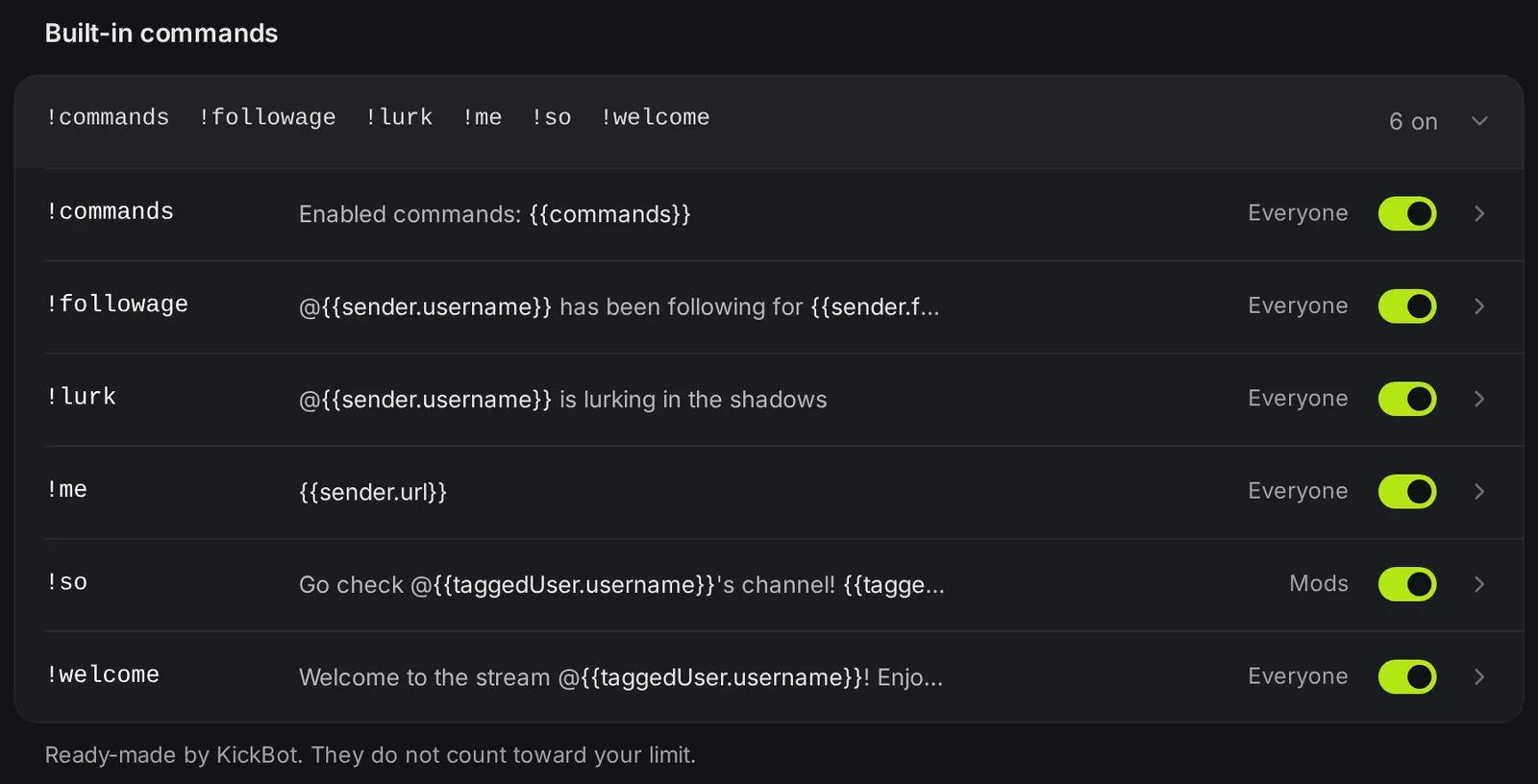
The six built-in commands
Section titled “The six built-in commands”| Command | Default reply | Example in chat | Who can use it |
|---|---|---|---|
!commands | Enabled commands: {{commands}} | Enabled commands: commands, followage, lurk, me, so, welcome, discord | Everyone |
!followage | @{{sender.username}} has been following for {{sender.followage}} | @kickbotdev has been following for 4 months 12 days | Everyone |
!lurk | @{{sender.username}} is lurking in the shadows | @kickbotdev is lurking in the shadows | Everyone |
!me | {{sender.url}} | https://kick.com/kickbotdev | Everyone |
!so @name | Go check @{{taggedUser.username}}'s channel! {{taggedUser.url}} | Go check @SomeChannel's channel! https://kick.com/SomeChannel | Mods |
!welcome @name | Welcome to the stream @{{taggedUser.username}}! Enjoy your stay. | Welcome to the stream @newviewer! Enjoy your stay. | Everyone |
What each one is for:
!commandslists every command that is on in your channel, built-in and your own.!followageshows how long the viewer has followed your channel. If they do not follow, KickBot posts@name is not following @yourchannel.!lurklets a viewer say they are watching quietly.!meposts a link to the viewer’s own Kick channel.!sois a shout-out. A moderator types!so @nameto point chat to another channel.!welcomegreets a new viewer. Type!welcome @name.
The replies use command variables. You (the streamer) can always use every command, even one set to Mods.
Change or turn off a built-in command
Section titled “Change or turn off a built-in command”- Open kickbot.com/dashboard/commands.
- Under Built-in commands, click the row with the command names to open the list.
- To turn a command off, use the switch on its row. It saves at once.
- To change the reply, the groups or the cooldowns, click the command. Change what you need and click Save.
The command name cannot change. If you want a different name, turn the built-in command off and make a custom command with the same reply.
Other commands KickBot answers
Section titled “Other commands KickBot answers”Other KickBot features have their own chat commands. They do not show in the commands list. Each one has its own page.
| Command | Who can use it | What it does | Turn it off |
|---|---|---|---|
!clip or !clip 45 | Groups you pick | Makes a clip of the last seconds of your stream. See clip command. | Clip command page |
!imagine + text | Groups you pick | Makes an AI image for your stream. See AI images. | AI images page |
@KickBot + text | Groups you pick | The AI character answers in chat. See AI character. | AI character page |
TTS voice commands, like !tts hello | Groups you pick for each voice | Reads the message on stream. See TTS chat commands. | My voices page |
!voices | Everyone | Posts the link to your public voice list. See voices. | TTS settings |
!ttson, !ttsoff, !ttsskip, !ttsclear, !ttsvol, !ttsdelay | Streamer and moderators | Control TTS. See TTS chat commands. | Always on |
!tippause, !tipresume | Streamer and moderators | Pause or resume tip alerts on stream. See tip queue. | Always on |
!subtest, !followtest, !gifttest, !kickstest | Streamer and moderators | Post a test chat alert. | Always on |
!ping | Streamer and moderators | KickBot replies Pong!. Use it to check that KickBot reads your chat. | Always on |
Kick’s own chat commands
Section titled “Kick’s own chat commands”Commands that start with /, like /ban, /timeout or /slow on 10, are Kick’s own commands, not KickBot commands. Kick runs them, and only the people Kick allows can use them. See Kick’s own moderator tools.
Is there a followage command on Kick?
Yes. With KickBot, viewers type !followage and KickBot posts how long they have followed your channel, for example @kickbotdev has been following for 4 months 12 days. It is on for every channel from the start.
How do I do a shout-out on Kick?
Type !so @channelname in your chat. KickBot posts a link to that channel. By default only you and your moderators can use !so.
Can I delete a built-in command?
No. You can turn it off with its switch. A command that is off does nothing in chat.