
Clip command (!clip)
With the KickBot clip command, viewers type !clip in your Kick chat while you are live. KickBot saves the last 30 seconds of your stream as a clip and posts the link in chat, for example @KickBotDev https://kickbot.com/clip/48fm1hd9. A viewer can also ask for a length, like !clip 60. You turn it on and set it up on the Clip command page under Chat bot.
Every clip also goes to your public clip page at kickbot.com/clips/yourchannel. See clip pages.
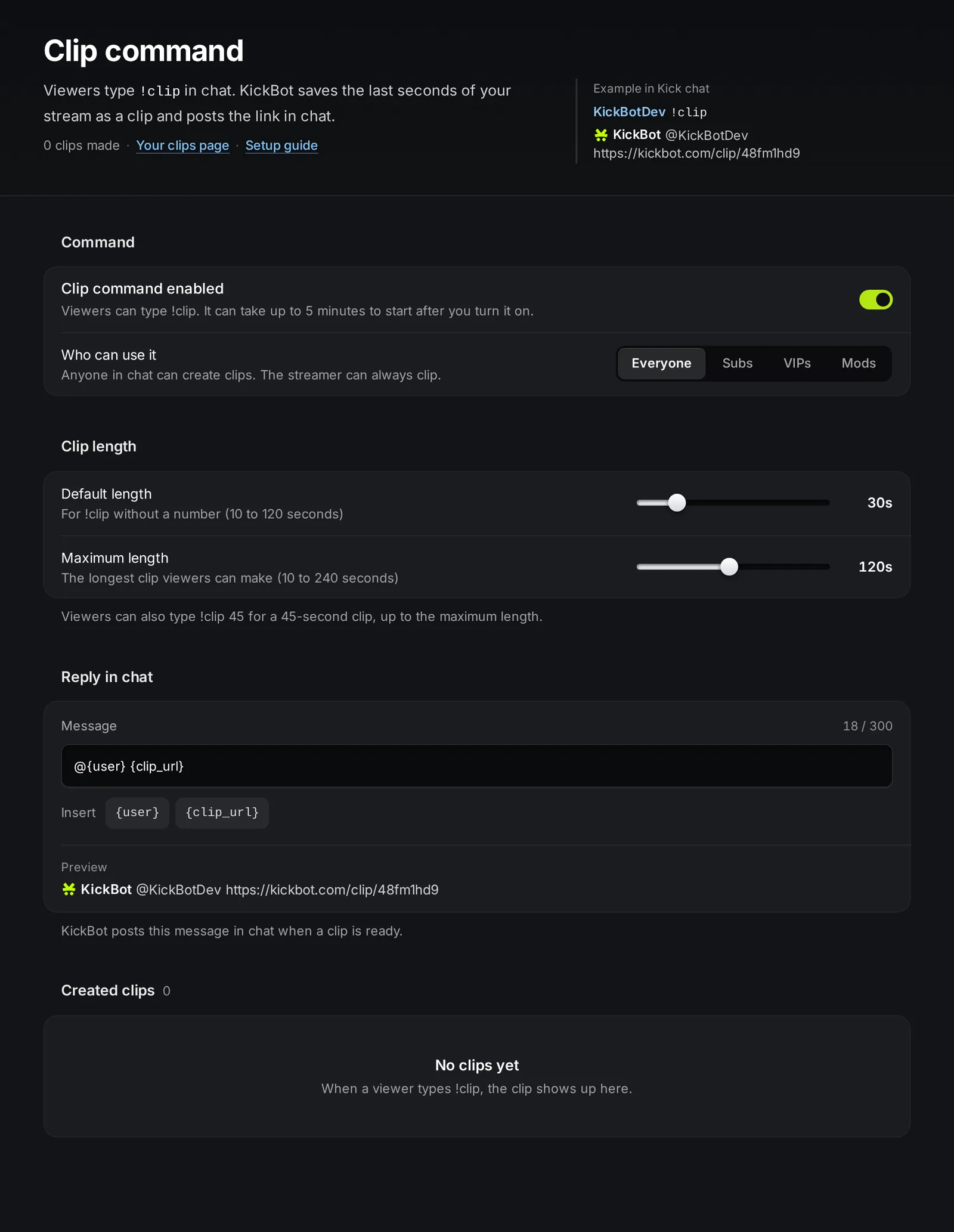
Turn on the clip command
Section titled “Turn on the clip command”You need KickBot as a moderator in your channel, so it can post the link.
- Open kickbot.com/dashboard/clipcommand.
- Turn on Clip command enabled.
- Under Who can use it, pick who can make clips.
- Go live and type
!clipin your chat to test it.
How viewers use it
Section titled “How viewers use it”| Viewer types | KickBot makes |
|---|---|
!clip | A clip with your default length (30 seconds unless you change it) |
!clip 45 | A 45-second clip |
!clip 500 | A clip with your maximum length, because 500 is more than the maximum |
The clip covers the time just before the viewer typed the command. It works only while you are live. When you are offline, KickBot does not make a clip and does not reply.
To stop spam, one viewer can make one clip at a time, with a short wait between clips.
Settings
Section titled “Settings”| Setting | What it does | Limits and default |
|---|---|---|
| Clip command enabled | Turns !clip on or off in your chat. | Off until you turn it on. |
| Who can use it | Everyone, Subs, VIPs, Mods, or a mix. | You (the streamer) can always clip. |
| Default length | The length for !clip without a number. | 10 to 120 seconds. Default 30. |
| Maximum length | The longest clip a viewer can ask for. | 10 to 240 seconds. Default 120. |
| Reply in chat | The message KickBot posts with the clip link. | 15 to 300 characters. Default @{user} {clip_url}. |
Who can use it
Section titled “Who can use it”With Everyone, anyone in your chat can clip. Turn Everyone off and pick Subs, VIPs or Mods (or more than one) to limit it. For example, Subs and Mods lets only subscribers and moderators clip. The text under the buttons tells you who can clip now.
Clip length
Section titled “Clip length”Set Default length and Maximum length with the sliders. For example, with a default of 30 and a maximum of 90, !clip makes a 30-second clip and !clip 200 makes a 90-second clip.
Reply in chat
Section titled “Reply in chat”Type the message in Message and press Enter to save it (Escape undoes your edit). Use Insert to add these variables:
{user}: the viewer who typed!clip{clip_url}: the link to the clip
For example, Clip saved by @{user}: {clip_url} posts Clip saved by @KickBotDev: https://kickbot.com/clip/48fm1hd9. The Preview under the box shows the result.
Find and manage your clips
Section titled “Find and manage your clips”- Created clips at the bottom of the page lists every clip made with
!clip. Sort it by Newest first, Oldest first, Most views or Least views. - To delete one clip, use the menu on the clip. To delete many, click Select, pick the clips and click Delete selected. You cannot undo this.
- Your clips page at the top opens your public page at
kickbot.com/clips/yourchannel, where viewers can watch and share your clips.
You can also make a clip with one key from a Stream Deck. See Stream Deck. To download clips as MP4 files, see the clip downloader.
Troubleshooting
Section titled “Troubleshooting”If !clip does not answer:
- KickBot is not a moderator. See add KickBot as a moderator.
- You are offline. Clips work only while you are live.
- You just turned it on. Wait a few minutes.
- The viewer is not in a group that can clip. Check Who can use it.
- The viewer clipped a moment ago. Each viewer can make one clip at a time. Wait a few seconds and try again.
How do I clip on Kick with a chat command?
Type !clip in the chat of a channel that uses the KickBot clip command. KickBot saves the last seconds of the stream and posts the link. Type !clip 60 for a 60-second clip, up to the channel’s maximum.
How long can a !clip clip be?
From 10 seconds up to the maximum the streamer sets. The maximum can be up to 240 seconds (4 minutes) with Premium, and 120 seconds on the Free plan.
Where do clips made with !clip go?
KickBot posts the link in chat. The clip is also in Created clips on your dashboard and on your public clip page at kickbot.com/clips/yourchannel.
Can I let only subscribers or mods clip?
Yes. Under Who can use it, turn Everyone off and pick Subs, Mods or both. You can always clip yourself.