
Tip alerts in OBS
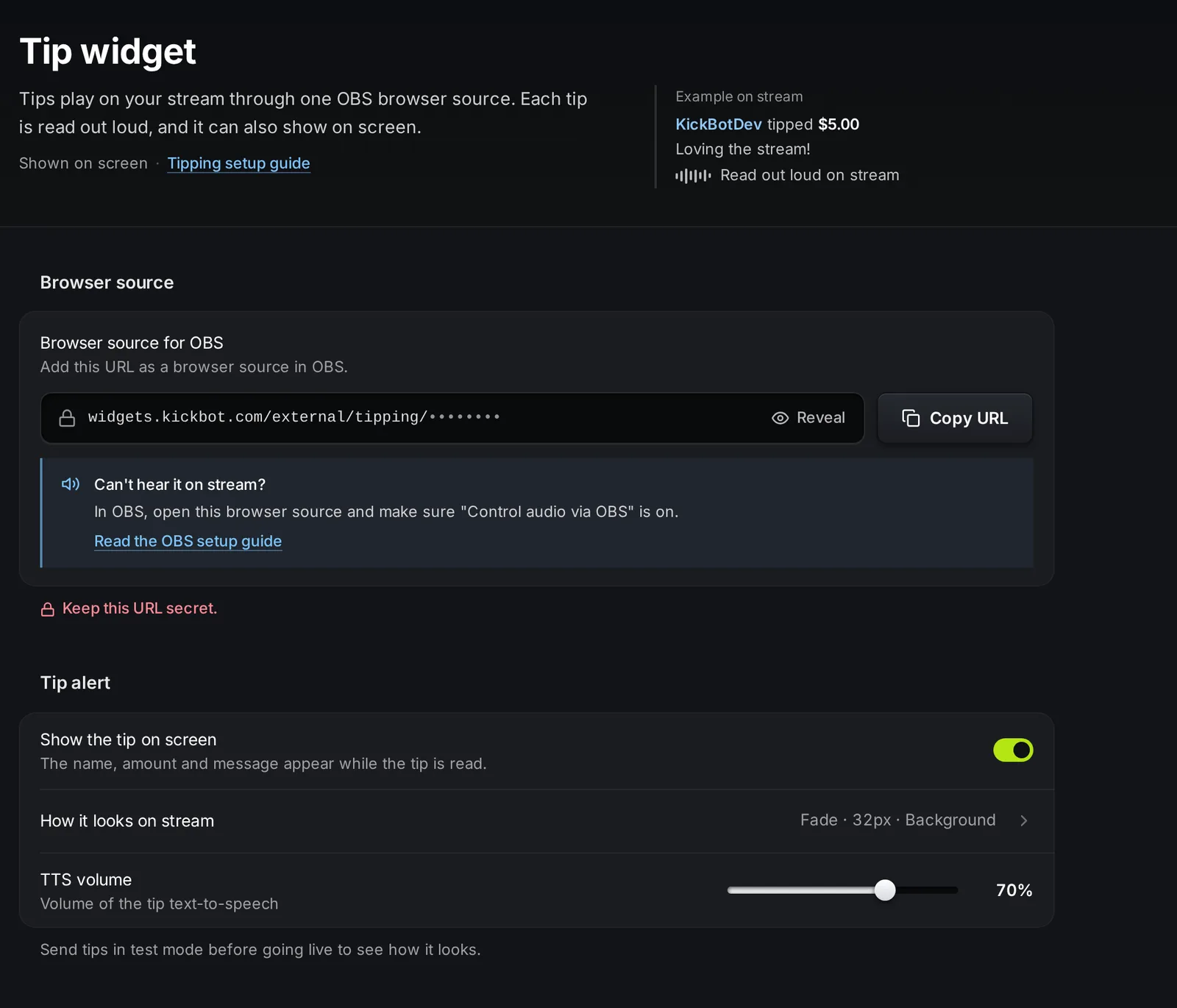
The tip widget is the browser source that plays tips on your stream. Each tip is read out loud with the voice the viewer picked, and the name, amount, message and GIF can show on screen. You find the widget link and its settings on Tipping > Widget.
The widget does more than show alerts. It also starts the payment: a tip is only charged when the widget plays it. If the widget is not open in OBS, tips cannot play and expire after 15 minutes without a charge.
Add the tip widget to OBS
Section titled “Add the tip widget to OBS”- Open kickbot.com/dashboard/tipping/widget, or click Tipping in the left menu, then Widget.
- In the Browser source group, click Copy URL. The link looks like
https://widgets.kickbot.com/external/tipping/xxxxxxxx. - In OBS, click + under Sources, choose Browser, give it a name such as “KickBot tips” and click OK.
- Paste the link in the URL box. Set the width and height, for example to the size of your canvas.
- Turn on Control audio via OBS, so the TTS goes to your stream. Click OK.
- Put the source in every scene you use while live, or in a scene that you nest into all of them.
The steps for Streamlabs Desktop and Meld are on add a browser source to OBS.
To check the connection, open the tip queue. Widget shows Connected when the browser source is open, and Not open when it is not.
Settings
Section titled “Settings”| Setting | What it does | Default and limits |
|---|---|---|
| Show the tip on screen | The name, amount, message and GIF show while the tip is read. When off, tips are audio only. | On |
| How it looks on stream | Opens a panel with the look of the alert and a live preview. | See below |
| TTS volume | The volume of the tip TTS. | 70%. From 0 to 100%. |
The switch and the volume save at once. The look is saved with the Save button in its panel. Each save reloads the open widget in OBS, so do not change it during a tip.
How it looks on stream
Section titled “How it looks on stream”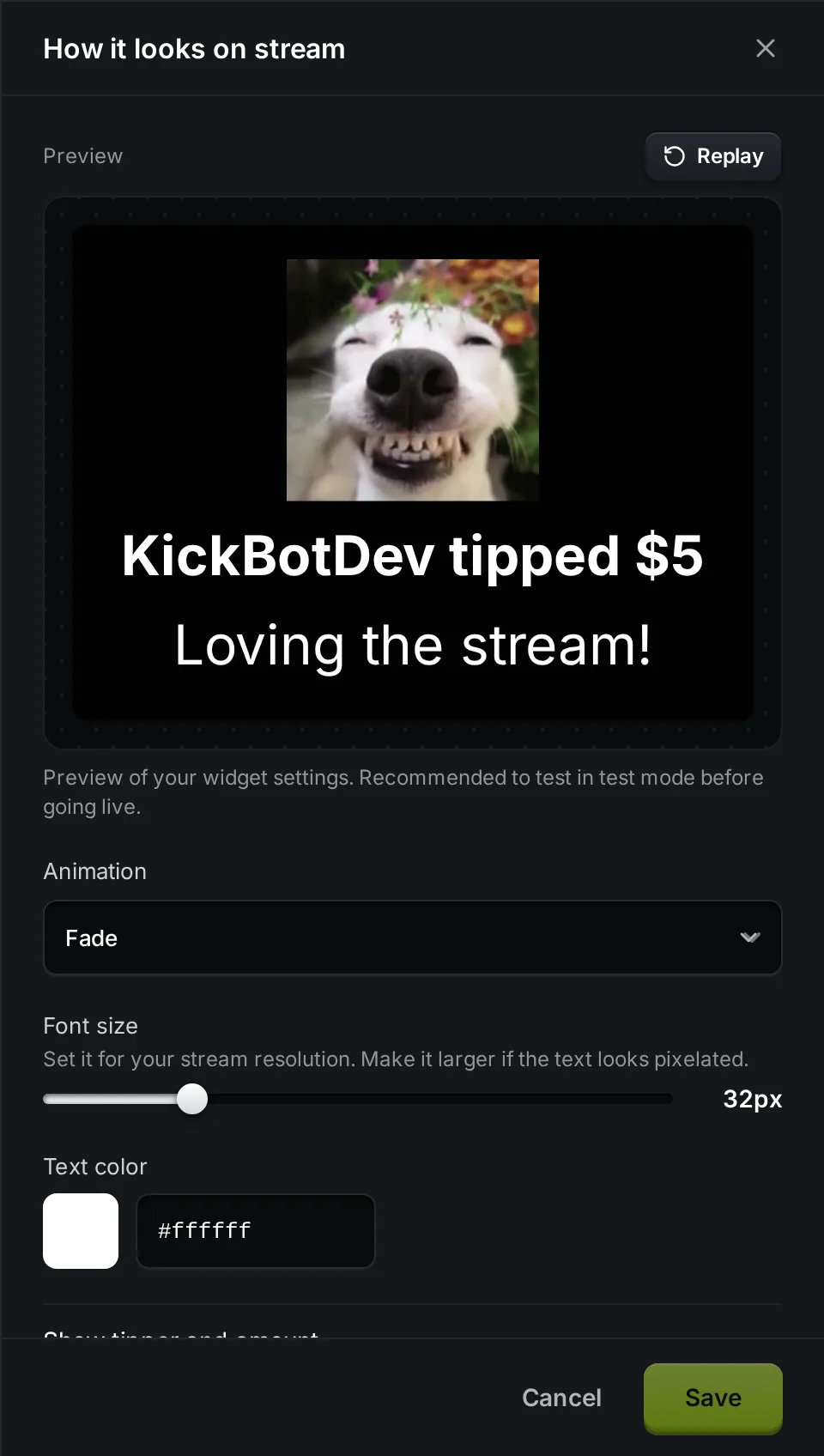
| Setting | Options | Default |
|---|---|---|
| Animation | None, Fade, Slide left, Slide right, Slide top, Slide bottom | Fade |
| Font size | 24 to 60 px. Make it larger if the text looks pixelated. | 24 px |
| Text color | Any color | White |
| Show tipper and amount | Shows “viewer123 tipped $5” above the message | On |
| Show background | A dark box behind the alert | Off |
| Background opacity | 0 to 100% | 100% |
Click Replay in the panel to see the animation again.
How a tip plays
Section titled “How a tip plays”Approved tips play one at a time. The widget shows the alert and plays the TTS. Then it waits for the Gap between tips that you set on the tip queue and plays the next tip. If a payment fails, the tip is skipped.
When the payment goes through, KickBot posts a message in your Kick chat, for example “viewer123 just tipped $5.00!”.
Test the widget
Section titled “Test the widget”Turn on Test mode on your tip page and send yourself a tip. It plays like a real tip, with TTS, and nobody is charged.
Troubleshooting
Section titled “Troubleshooting”Tips do not play, and the queue says Widget: Not open. The browser source is not loaded. Check that the source is in your current scene, that it is visible, and that the URL is the full link from the Widget page. In OBS, right-click the source and click Refresh.
I can see the tip, but nobody hears it. Open the browser source properties in OBS and turn on Control audio via OBS. Then check the source in the OBS audio mixer and the TTS volume on the Widget page.
Tips expire. A tip that does not play within 15 minutes expires and the viewer is not charged. Keep the widget open while you accept tips, and approve tips in time if you use manual mode.
The text looks blurry. Raise the Font size, and make sure the browser source size matches your canvas.
How do I add tip alerts to OBS for Kick?
Copy the browser source URL from KickBot under Tipping > Widget, then add a Browser source in OBS with that URL. Tips then play on stream with TTS and an on-screen alert.
Can I use tips as audio only?
Yes. Turn off Show the tip on screen. The tip is still read out loud, and nothing shows on screen.
Why do I need the widget open to get paid?
KickBot only charges a tip when it plays on your stream. If the widget is not open, the tip cannot play, so it expires after 15 minutes and the viewer is not charged.